How your clinic is running, and why the numbers moved.
Rebooking, did-not-attend and late cancellations, new patients, patients who have not rebooked and letters still owed. All worked out from the appointments and notes your clinic already keeps, with the records behind each figure a click away.
A setup call first: nothing in your practice software is read until your clinic signs up and connects it.
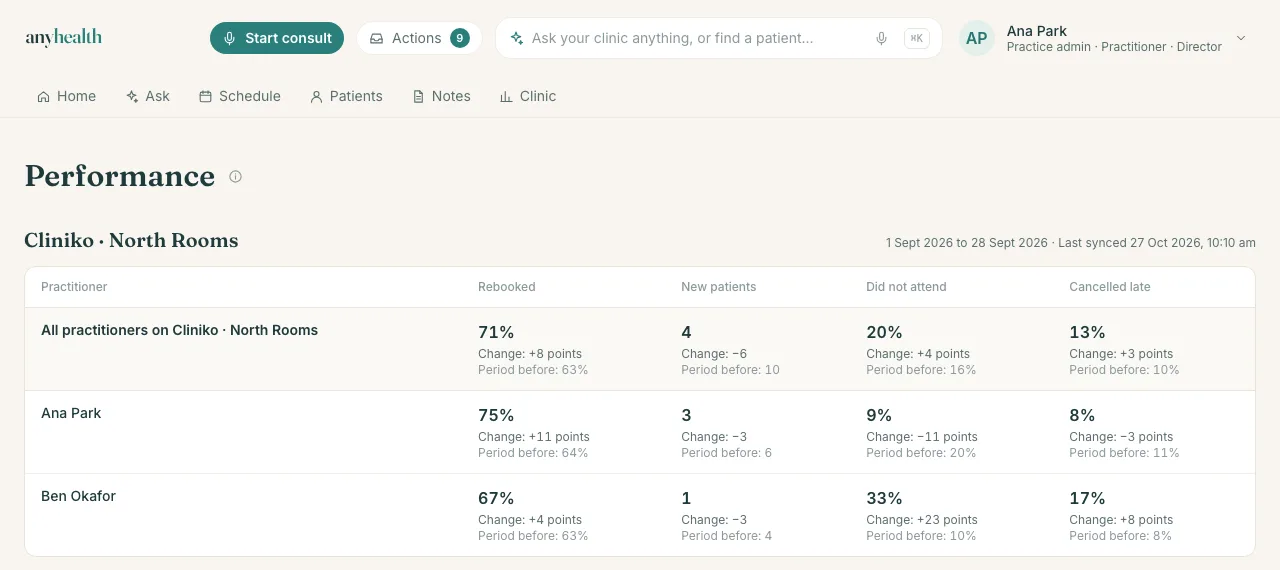
Every practitioner sees their own numbers first.
Each practitioner sees rebooking, did-not-attend and late cancellations for their own patients, next to how they looked before the clinic started with Anyhealth, and their own week: notes written after hours, how long notes take to be signed, and what is still outstanding.
Directors see the whole clinic.
The clinic’s numbers, and what moved them
Each rate against the period before, with the change split by practitioner, appointment type and location, so “rebooking dropped” arrives with where it dropped.
The team’s load
Documentation written after hours, documentation lag, outstanding notes and how full each diary runs, practitioner by practitioner, as a table of changes rather than a league table.
Across every location and every practice software account
A group running more than one practice software account sees one clinic, each figure labelled with the account it came from.
A number you can open.
Click any figure to see the appointments and patients it counts, and the ones it left out and why.
If there are too few appointments in the period, or the clinic has not marked its appointment types, Anyhealth says so instead of showing a number.
From the number to the work.
Patients who have not rebooked become a recall list, and letters still owed become drafts, each for a person to review and send. Ask about any of it in plain English.
See it on a clinic like yours.
A short call to set your clinic up and connect your practice software. Your own numbers follow once your history has loaded.
A setup call first: nothing in your practice software is read until your clinic signs up and connects it.